6. Brand Contests (Incentive Campaigns)
Last updated: May 28, 2026
Contest are designed to re-engage creators, boost content output, and increase performance.
Many sellers struggle to run contests on their own because of:
Back-and-forth coordination on contracts
Manual tracking of deliverables
Designing contest rules or promotional flyers
Managing payouts across creators
Euka Brand Contests streamline the entire process by handling:
Creator enrollment
Deliverable tracking
Real-time leaderboard (creators can see their rank live)
Rule enforcement and disqualification
Payouts (cash) and reward fulfillment (custom prizes)
⚠ Available on the Growth plan+ only. Starter plan brands need to upgrade before they can create a contest.
Euka Brand Contests support four incentive formats:
Posting Challenges — pay creators for hitting video count tiers
GMV Challenges — pay creators for hitting revenue thresholds
Leaderboard Contests — rank creators against each other by GMV or post count
CPM Contests — pay creators per 1,000 views
Each contest is set up as one type only — types cannot be combined into a single hybrid contest.
Shared capabilities across all four types:
Multiple tiers — every contest supports flexible, customizable tiers
Cash or custom rewards — each tier can pay out as cash or a custom reward (free product, exclusive experience, trip, even a Tesla)
Custom reward fulfillment — either Euka handles payout (brand pre-funds) or the brand ships directly (Euka shares creator addresses)
Max Budget — set a spend ceiling; the contest automatically ends when the budget is hit
Public or Private — public contests appear in the Euka creator app; private contests are invite-only via direct link
One-time or recurring — recurring contests repeat weekly, bi-weekly, or monthly with the same structure
Content type — Video Only, Video + Livestream, or Livestream Only (note: livestream modes require ALL store products; only Video Only supports selecting specific products)
Disqualification rules — choose from 7 presets (spam, AI-generated, no product shown, faceless, off-brand, fraudulent purchases, creator-initiated boosting) plus up to 10 custom rules
💡 Tip: Get creative with rewards. Brands that offer high value or experiential prizes (trips, a year on the PR list, Coachella tickets, exclusive high-value products) consistently see stronger creator participation than cash-only setups.
Upload a Contest Flyer During Setup
We strongly recommend creating a contest flyer and uploading it into the contest description (and/or banner image) during setup, before you launch.
A visual flyer:
Adds credibility, the contest looks more official and intentional on the landing page
Increases visual appeal when creators preview the contest
Communicates the reward structure faster than a paragraph of copy
Doubles as a shareable asset, once it's on the contest page, every creator who lands there sees it
Include the flyer in your outreach so creators are more likely to click into the contest link and join the contest.
💡 Tip: Match the flyer to your brand's visual identity and feature the hero prize prominently. Brands that lead with the biggest reward (trip, hero product, top cash tier) consistently see higher participation.
How to Choose the Right Contest Type
Start from your primary goal, then check your store data, don't default to GMV.
Brand Goal | Recommended Type |
Drive revenue / sales | GMV Challenge or Leaderboard (sort by GMV) |
Get more videos / content volume | Posting Challenge |
Maximize reach / views / impressions | CPM Contest |
Create competition among creators | Leaderboard |
Then check store signals:
Video count declining → Posting Challenge (creators have product but aren't posting)
Sample approvals down → Posting Challenge (activate creators who already have product)
Healthy content volume + revenue goal → GMV Challenge
Large active creator pool → Leaderboard (enough creators for real competition)
Brand wants awareness → CPM Contest
⚠ Anti-GMV bias: Most brands say "I want sales," which biases toward GMV. But if your store data shows declining video count or low sample approvals, a Posting Challenge is the better path to sales, because the bottleneck is content, not conversion.
6.1 Posting Challenge
Goal: Drive content volume. Pay creators when they post a target number of qualifying videos.
How it works: Set tiers based on video count. Each tier has its own reward. A creator who posts 20 qualifying videos gets the 20-video reward; a creator who posts 50 gets the 50-video reward.
Recommended setup:
Duration: 27–31 days
First tier: ~5 videos
Minimum GMV qualifier: Set minimum GMV per video to filter out spam (a video that drives even one sale shows it's real)
Strongly recommend the "Spam or Mass-Produced Content" DQ rule
Example tier structure (just an example, the higher the reward the higher the engagement!) :
3 videos → $20
5 videos → $30
10 videos → $75
20 videos → $150
35 videos → $250
50 videos → $400
75 videos → $650
💡 Best for: Cold-start brands, products with declining content output, or any time the bottleneck is video volume rather than conversion.
6.2 GMV Challenge
Goal: Drive revenue. Pay creators when they cross GMV thresholds with the brand's products.
How it works: Set GMV thresholds with associated rewards. Optionally require a minimum number of videos to qualify.
Recommended setup:
Duration: ~37 days
First threshold: ~$100 GMV → ~$50 reward
Optional minimum video count to encourage creators to post more
Example tier structure:
$500 → $100
$1,000 → $150
$2,500 → $250
$5,000 → $400
$10,000 → $700
$20,000 → custom (consider a hero prize)
💡 Best for: Stores with healthy content volume where conversion is the focus — content isn't the bottleneck, revenue is.
6.3 Leaderboard Contest
Goal: Create competition. Rank creators against each other and reward top positions.
How it works: All participating creators see their rank live on the contest page. Brands can share the leaderboard link directly with creators so they can track positioning in real time — this is what drives ongoing engagement throughout the contest.
Configuration:
Set by: GMV or post count
More tiers = more participation. When creators see more rank positions with rewards, more of them feel they have a realistic shot at winning.
Hero prizes are the differentiator. Leaderboards generate far more excitement when top ranks include creative high-value rewards (trips, experiences, major products) rather than cash alone.
Recommended setup:
Duration: ~32 days
Min GMV qualifier: ~$1,000 (when sorting by GMV)
Min videos qualifier: Optional
💡 Best for: Brands with a large, active creator pool — you need enough creators for the competition to feel real.
6.4 CPM Contest
Goal: Maximize reach. Pay creators per 1,000 views.
How it works: Set a CPM prize (e.g., $3 per 1,000 views). Creators earn proportionally to view volume. Per-video and per-creator caps prevent runaway payouts.
Recommended setup:
Duration: ~27 days
CPM prize: $3 per 1,000 views
Max views per video: 1,000,000 (caps payout from a single viral video)
Min views per video: 1,000 (filters out videos with no reach)
Min GMV per video: Optional, useful for filtering spam
Max payout per creator: Set a ceiling per creator
⚠ Always enable the "Creator-Initiated Boosting or Promotion" DQ rule for CPM contests — it's the most common abuse vector when payout is tied to views.
💡 Best for: Brand awareness pushes, product launches, top-of-funnel reach goals.
Recommended Disqualification Rules by Type
Contest Type | Always Recommend |
All types | Fraudulent Purchase or Return Behavior, No Product Shown |
Posting Challenge | Spam or Mass-Produced Content |
CPM Contest | Creator-Initiated Boosting or Promotion |
Budget Estimation
A reliable way to estimate contest spend:
Lock in your contest setup (type, tiers, rewards)
Pull the last 30 days of store data
Estimate the number of creators likely to qualify per tier
Multiply: creators × reward per tier = estimated budget
Set a Max Budget as a safety net the contest will automatically end when the cap is reached, so you can't overspend
6.5 How to Promote Your Contest
Creating the contest is only half the work, the keys to a successful contest are getting it in front of as many creators as possible.
Right after your contest is launched, you'll see a "Your contest is updated" popup with three built-in ways to share it:
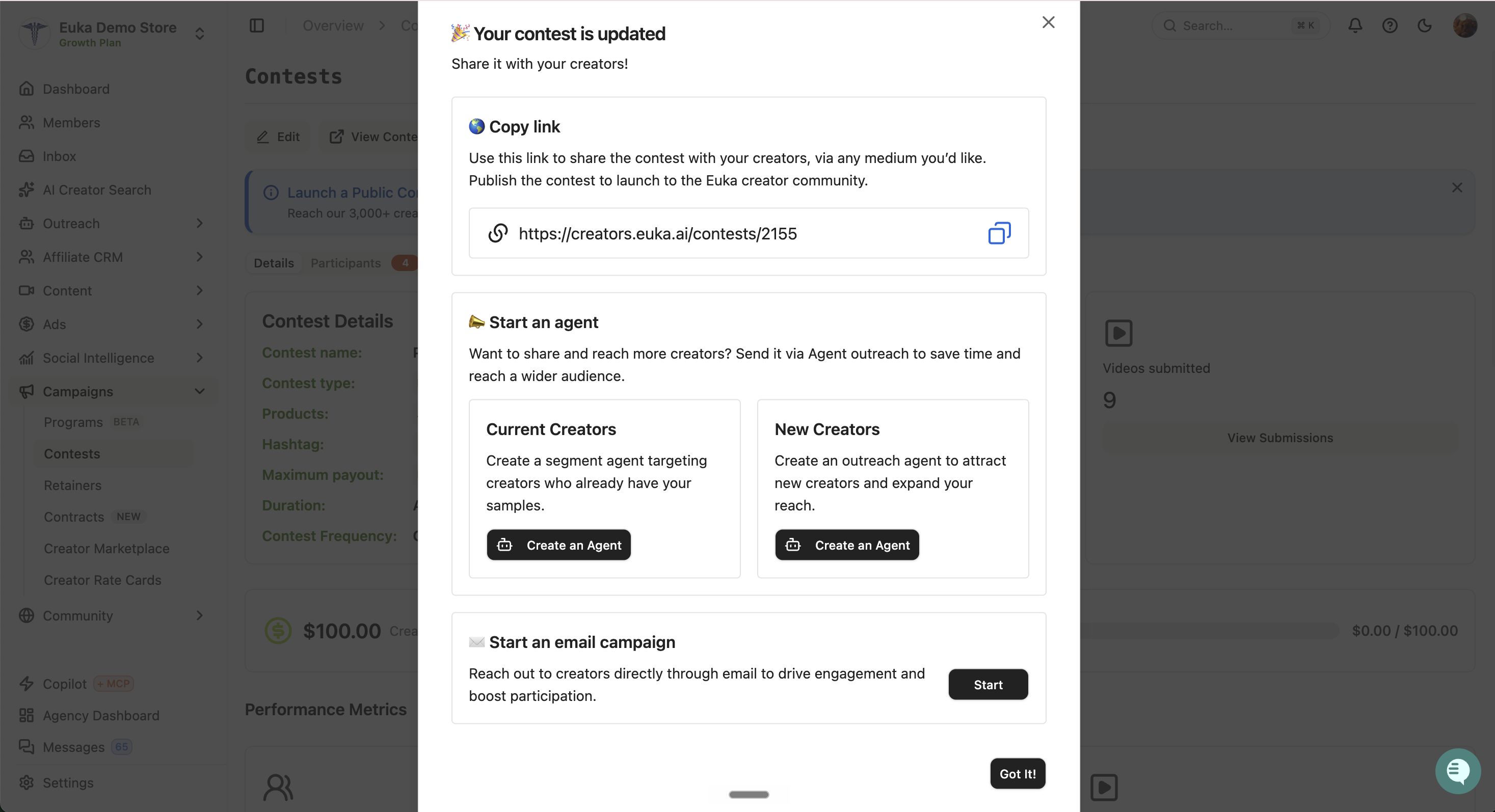
🌐 Copy link — your shareable contest URL (e.g.,
https://creators.euka.ai/contests/Mayglowup)📣 Start an agent — either a segment agent for existing creators or an outreach agent for new creators
✉ Start an email campaign — reach creators through email as a backup channel
You can return to this share menu anytime from the contest detail page.
Step 1: Share the Link Directly in Your Own Channels
If you already have direct lines to creators, use them first, these are your highest-converting channels.
WhatsApp channels or Discord communities — drop the contest link in your existing creator community to drive immediate sign-ups
Direct messages to close creators — for creators you have an established relationship with, send the link personally and let them know about the extra bonus available during the contest period
💡 Why this works: Creators who already know your brand will join faster than cold creators. Hit them first.
Step 2: Reach Existing Creators via a Segment Agent
A segment agent is the best way to notify creators who already have your samples, they're the most likely to participate quickly because the product is already in their hands.
How to set it up:
From the share popup, click Create an Agent under Current Creators
Customize the segment (most common use case: creators who already have a sample)
Choose your agent type:
Message Only — if all targeted creators already have the product
Target Invite + Message — recommended if most creators don't have the sample yet, or if the contest includes a new product the creator hasn't received. This way the creator gets a Target Invite to apply for a sample alongside the contest message.
Edit the pre-populated contest message template, it includes step-by-step instructions for joining the contest
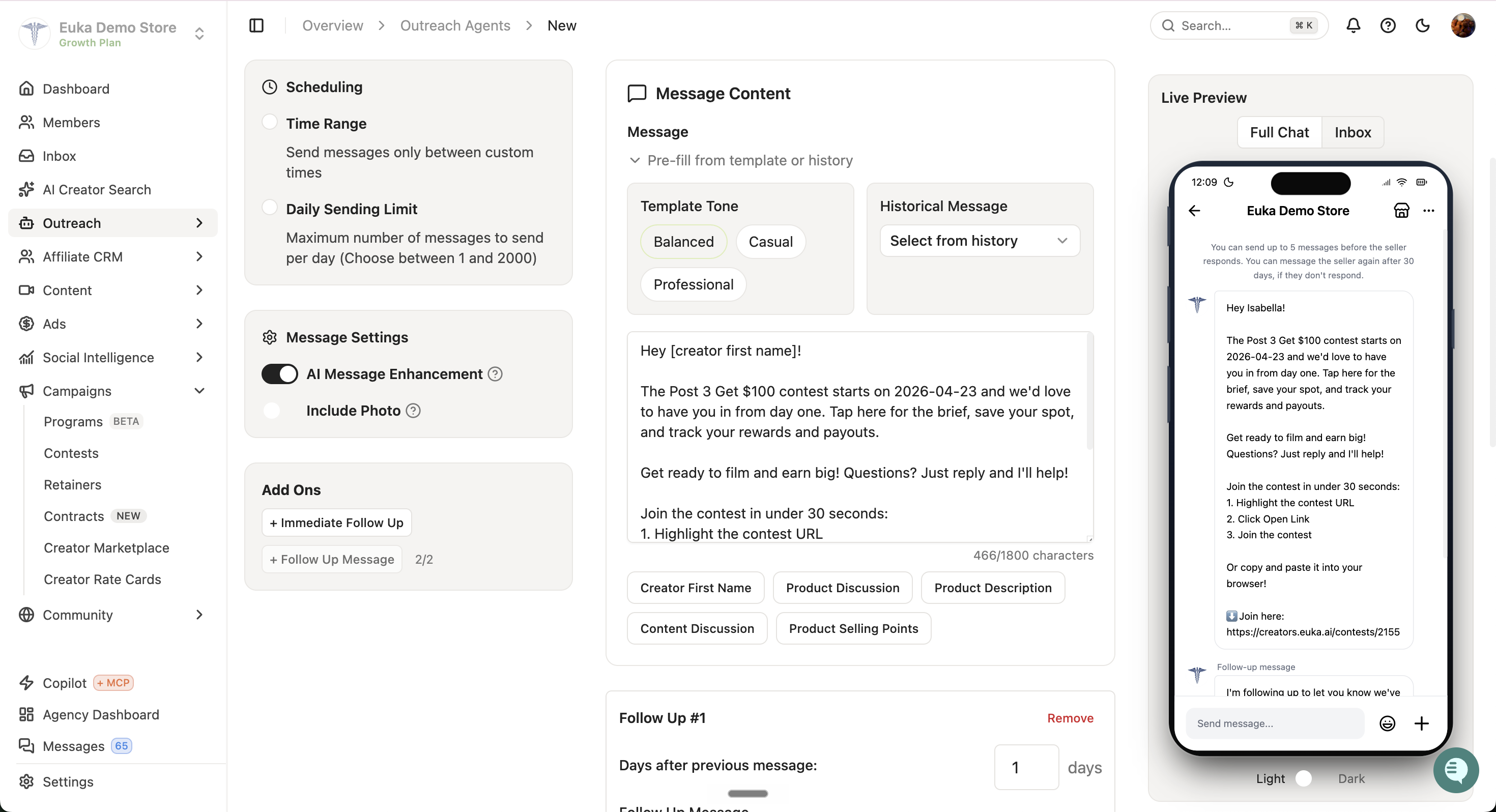
Message best practices:
Always include the contest link
Place the link at the call-to-action (CTA) at the bottom of the message so creators can easily copy, paste, or highlight it
Add two follow-up messages — if the creator doesn't reply, Euka will auto-trigger the follow-up after the day delay you configure
⚙ Auto-refresh: Segments refresh every 4 hours. Any creator who meets the segment conditions will be auto-added and triggered with the message automatically, so the agent keeps onboarding new creators throughout the contest.
Step 3: Attract New Creators via an Outreach Agent
A contest is one of the strongest hooks for attracting brand-new creators. Even brands that struggle to get cold creators to apply for samples often see lift here — when a creator sees there's an active contest with extra bonuses, the chance of them requesting a sample increases significantly.
How to set it up:
From the share popup, click Create an Agent under New Creators
Target your audience using filters, or upload a creator list directly
Recommended agent type: Target Invite + Message — so when the creator sees the contest link, they can also get a Target Invite to request a sample in the same flow
Add two follow-up messages for non-responders
💡 Why this works: Contests give cold creators a reason to request a sample and pay attention to your outreach. Creators’ DMs are already flooded with messages, so having a contest is a great way to make them more interested and excited to promote your product.
Step 4: Run an Email Campaign as a Backup Channel
Some creators miss TikTok Shop DMs. Email is a strong fallback sometimes a creator who never opens their TikTok inbox will see your email and join the contest.
Use the Start button under Start an email campaign in the share popup
Include the contest link prominently
This works particularly well as a parallel channel alongside your agent outreach
Step 5: Track Contest Participants via Auto-Tags
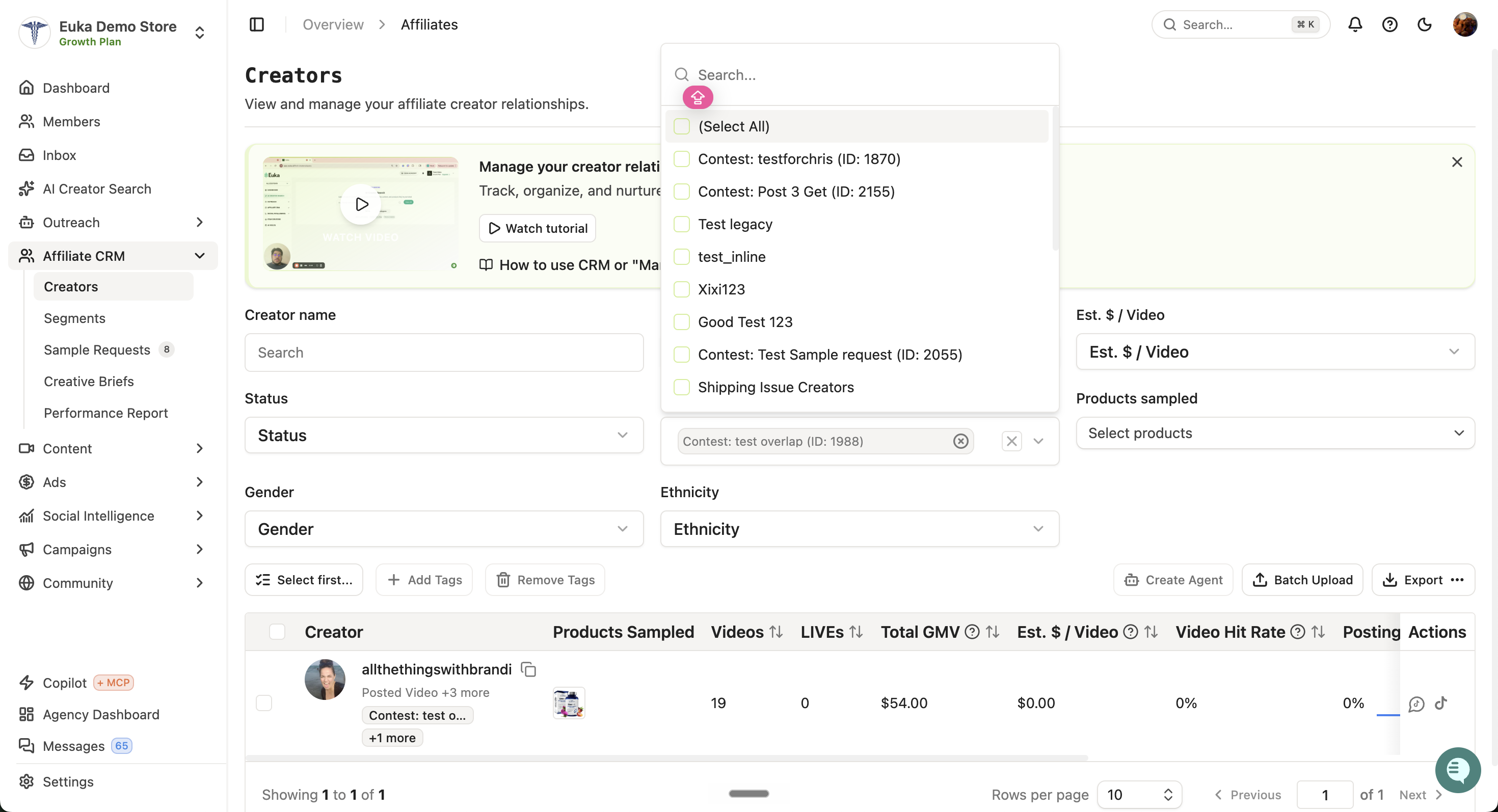
Once a creator joins your contest from the Euka creator app, Euka automatically tags them with a contest-specific tag (e.g., Contest: Glow Up Challenge (ID: 1234)).
You can find these tagged creators in two places:
Affiliate CRM → Creators page — filter by tag to see everyone who joined
Affiliate CRM → Segments → Create New Segment — create a new segment with the filter
Tag is Contest: [your contest name]to build an ongoing list
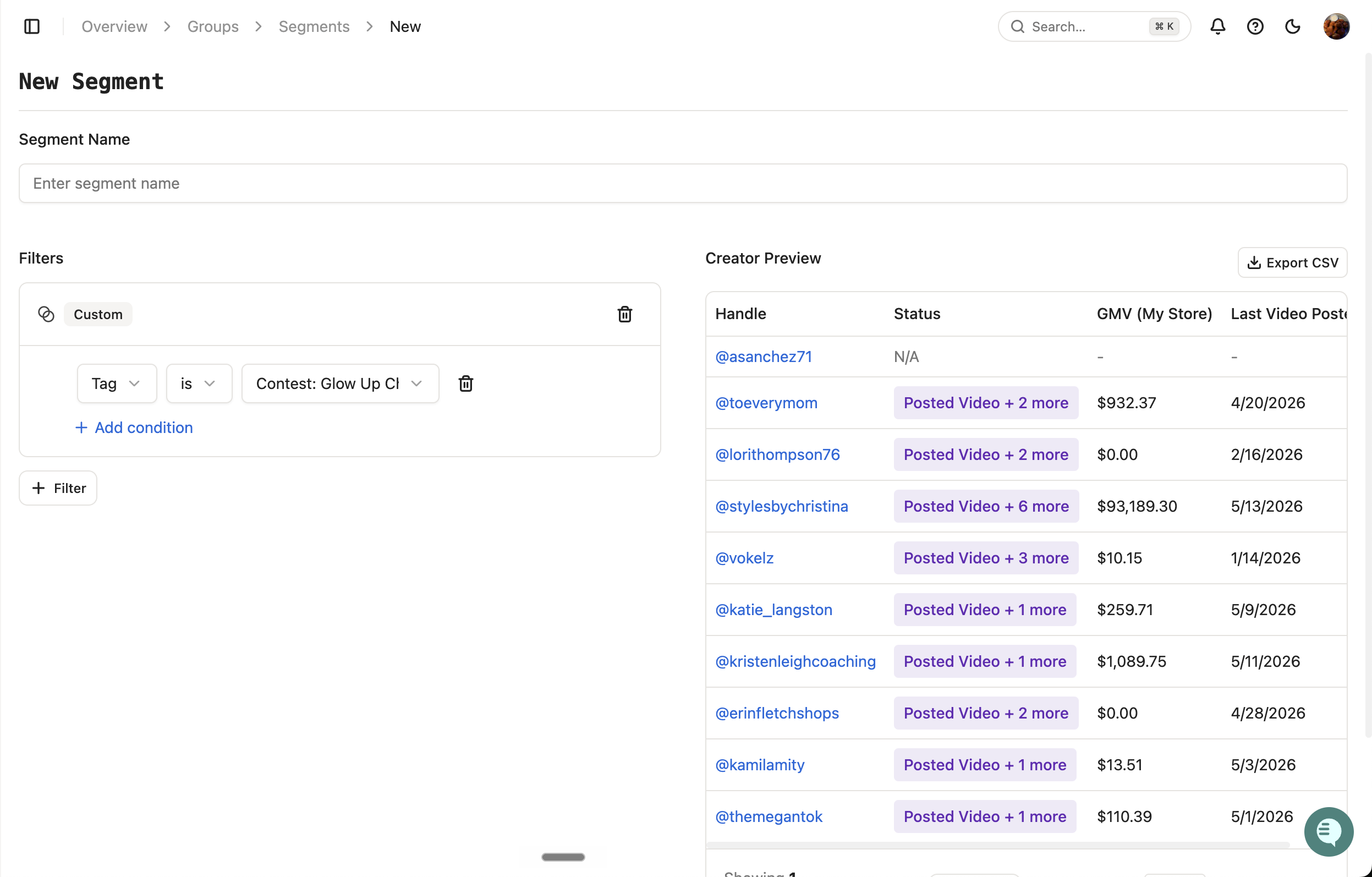
This unlocks the most important mid-contest move: re-engagement.
Step 6: Publish a Contest Announcement on the Contest Page
Anytime during the contest, you can publish an announcement that appears directly on the contest landing page. Every creator who revisits the contest sees it — making this a strong passive channel for ongoing communication without needing to DM each participant.
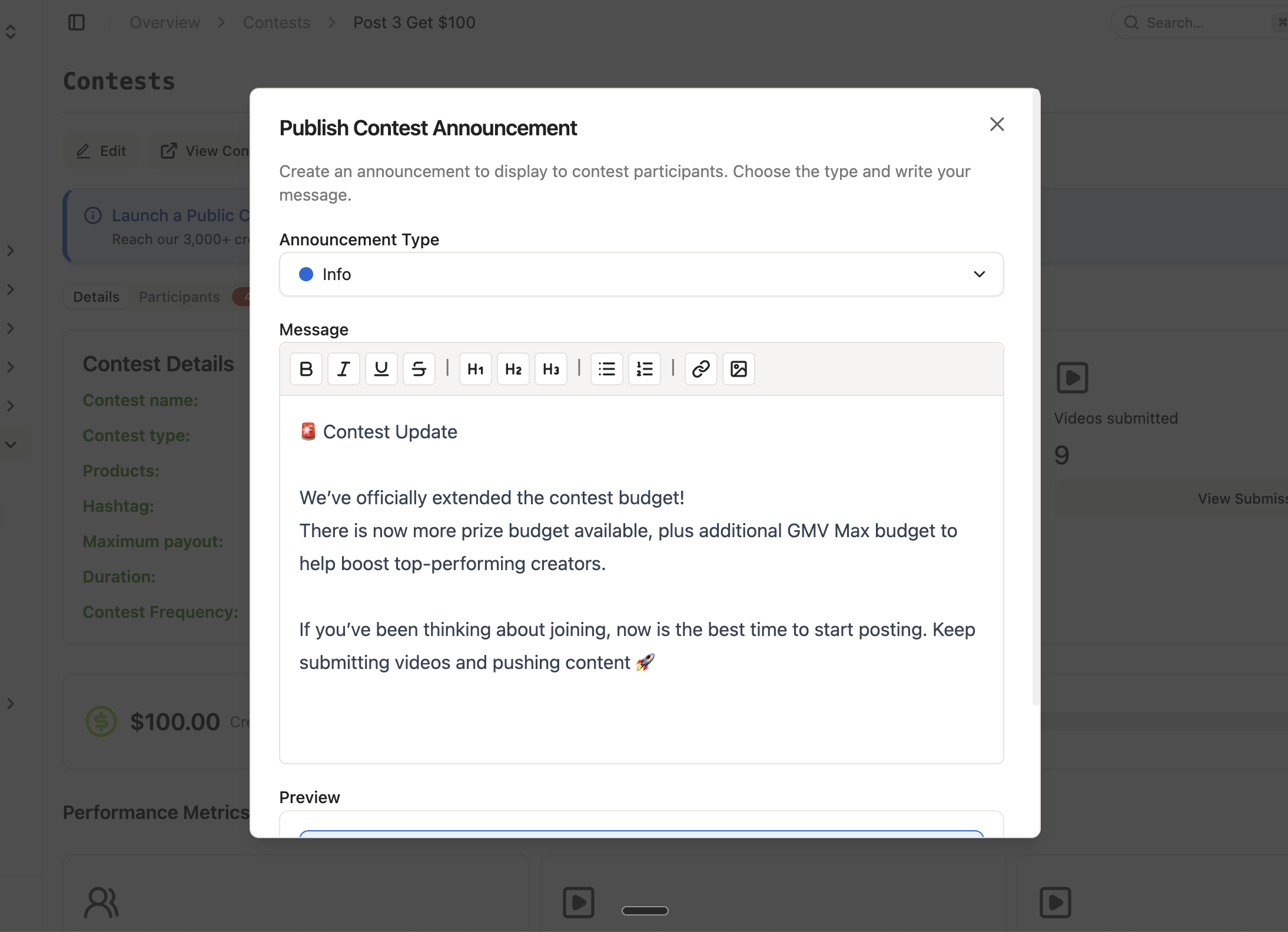
How to publish:
Go to your contest → click Publish Contest Announcement
Choose an Announcement Type:
🔵 Info — neutral updates (budget extensions, new product additions, milestone callouts)
🟡 Warning — important notices (rule changes, DQ reminders, deadline alerts)
🟢 Success — celebratory updates (top performer shoutouts, contest goals hit)
Write your message — the editor supports bold, italics, headings, lists, links, and images
Publish — the announcement immediately renders on the contest page
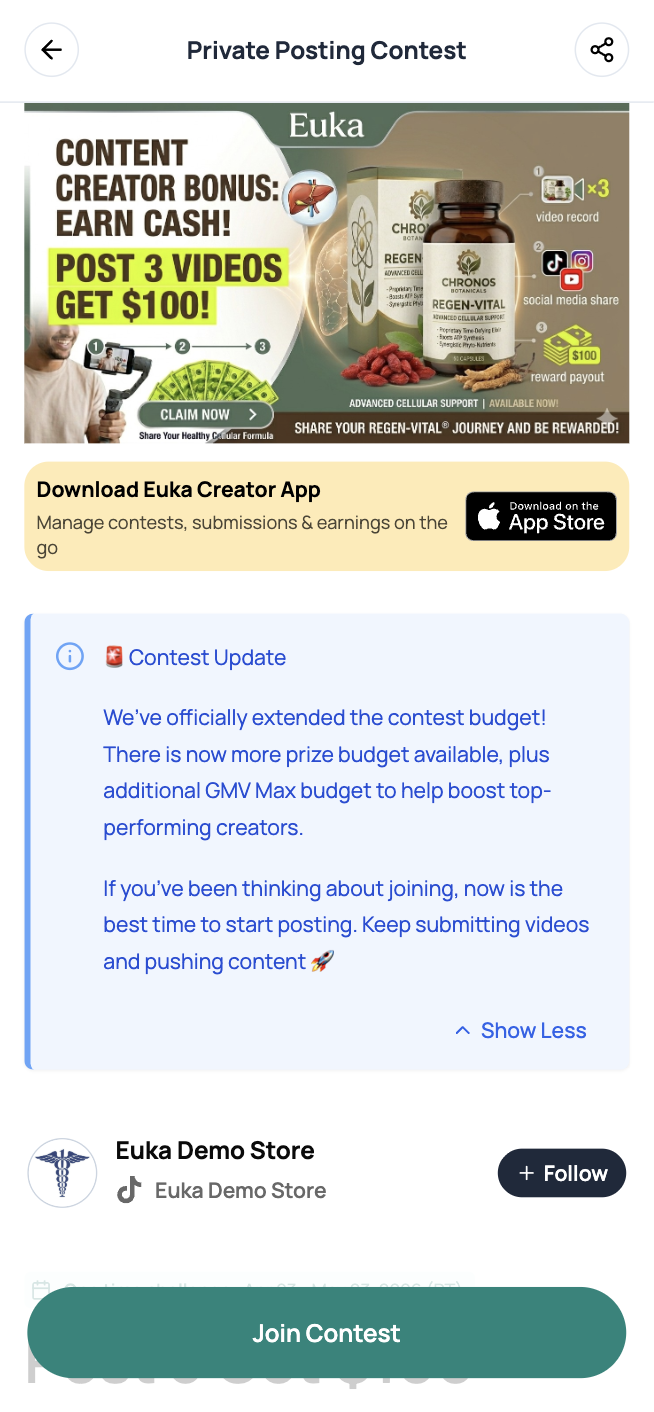
When to use announcements:
Budget extended — let participants know there's more prize money available, encouraging continued posting
Halfway point — remind creators the contest is still active
New prize tier added — let leading creators know there's an extra reward to chase
Final 48 hours — drive a last push for video submissions
GMV Max budget boost — flag additional ad support for top-performing creators
💡 Best practice — pair announcements with outreach. When you publish an announcement, also send the mid-contest leaderboard nudge (Step 7) to your contest-participant segment. The announcement catches creators who naturally revisit the page; the DM/email brings the rest back.
Step 7: Send a Mid-Contest Leaderboard Nudge
⚠ Don't let momentum die. Many creators join a contest at the start and then forget about it.
About halfway through the contest, send a message to your contest-participant segment with the real-time leaderboard link. This does two things:
Reminds creators the contest is still going and there's still time to post more videos
Motivates leading creators to post more — when a creator sees they're winning, they'll fight to stay on top by posting additional videos
How Payouts Work
Once your contest ends, we'll wrap up submissions and share the final results within one business day. We build in this buffer because TikTok Shop sometimes has a delay syncing GMV, and we want to make sure every creator's numbers are accurate before payouts are calculated.
Once results are ready, open the Payouts tab to see every creator who qualified as a winner, along with their total videos, GMV, views, and the exact payout amount they've earned.
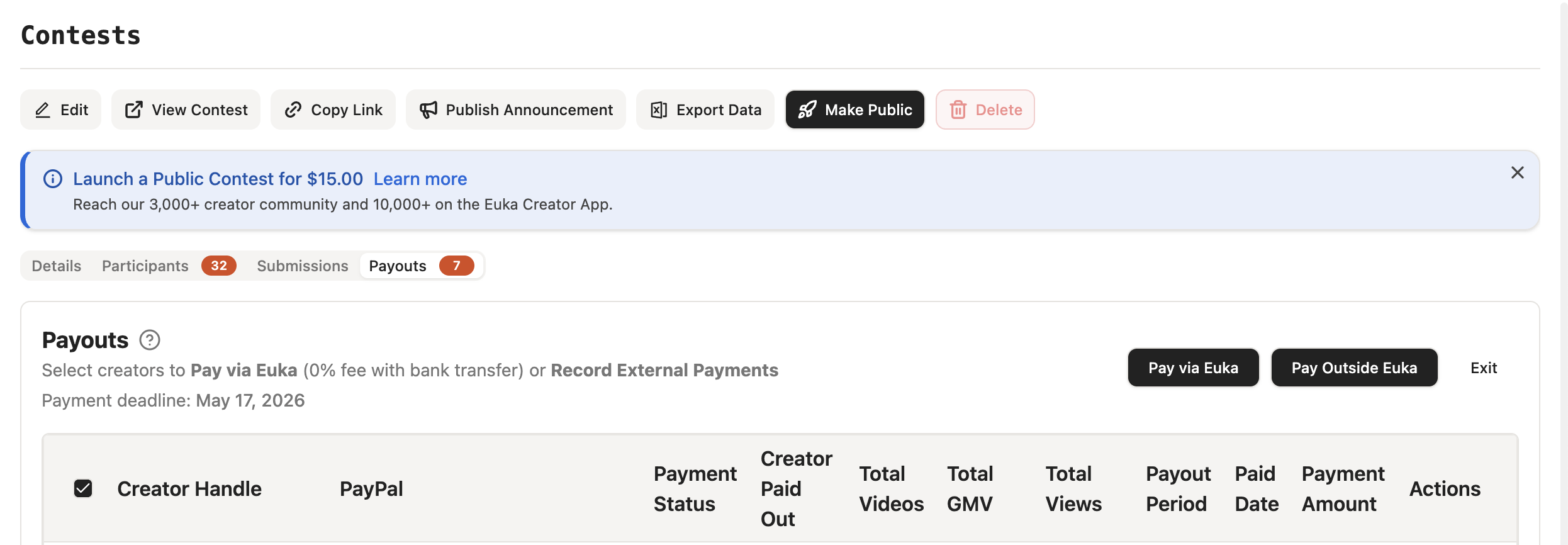
Before processing payments, take a moment to review the list. If a creator violated one of your disqualification rules, hit Disqualify on their row and add a reason — they'll be removed from the payout queue.
When you're ready, you have two ways to handle the payout:
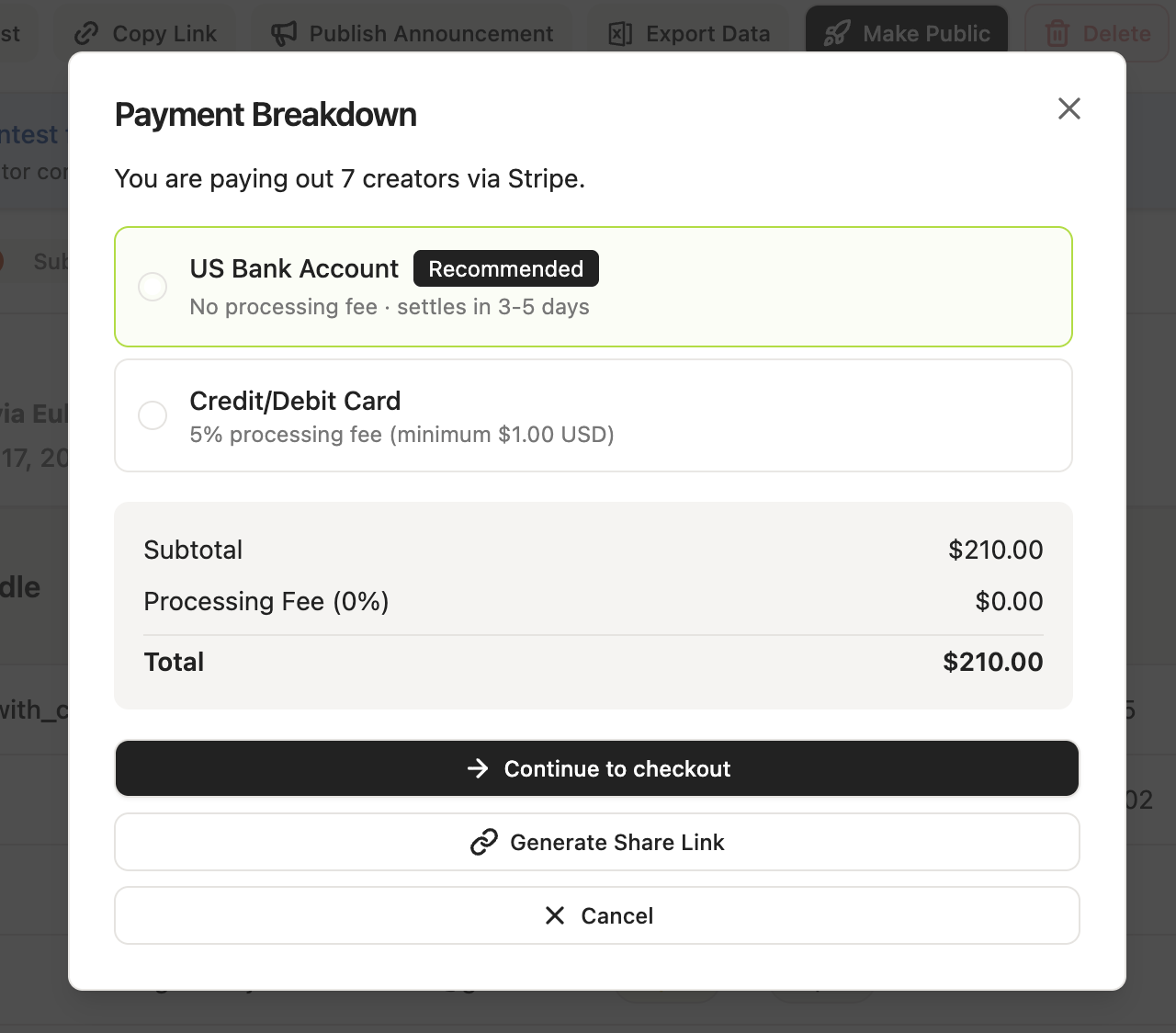
1. Pay via Euka. Select the winning creators and choose a payment method:
US Bank Account — 0% processing fee, settles in 3–5 days (recommended).
Credit/Debit Card — 5% processing fee (minimum $1.00).
Once you confirm payment, the funds are credited to each creator inside the Euka Creator app. Creators can then go to their profile and withdraw to PayPal whenever they want.
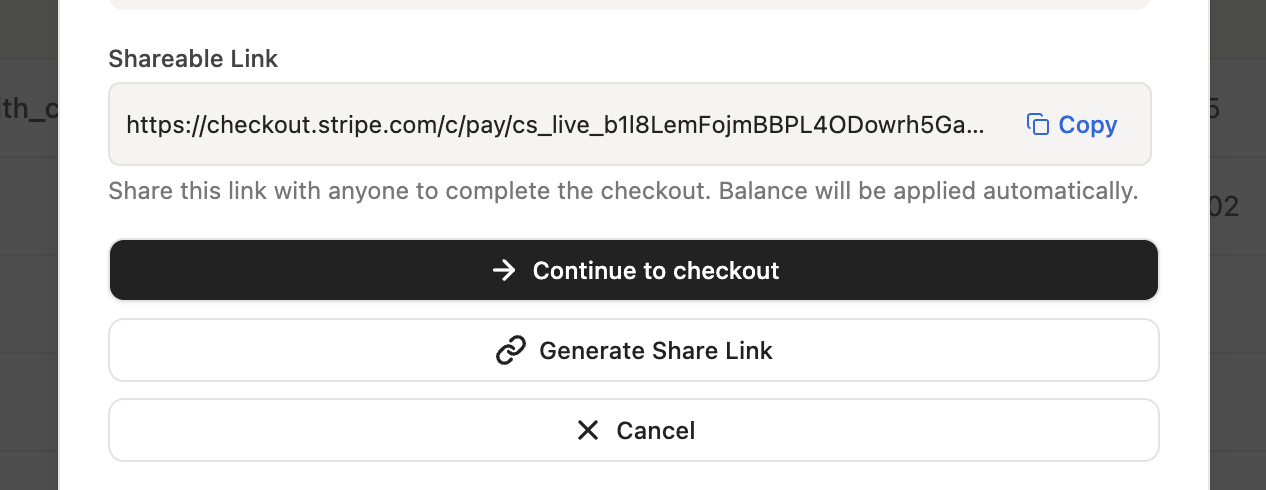
If you're not the one actually paying — for example, an agency managing the contest on a brand's behalf, hit Generate Share Link to create a secure Stripe checkout URL for the exact payout amount. Send that link to the brand, your finance team, or any other paying party. Once they complete checkout, the payout is processed automatically.
2. Pay Outside Euka. We surface each creator's PayPal email directly in the payout table, so you can send funds manually using your own tools. Once you've sent payment, come back to Euka and mark the creator as paid so the record stays in sync.
The payment deadline shown at the top of the Payouts tab (e.g., May 17, 2026) is the date you set when configuring the contest, it's your commitment to the creators about when they can expect to be paid.